Best Monitor Arms for Standing Desks in 2026: Complete Buying Guide
The right monitor arm transforms your standing desk from functional to exceptional. Yet with dozens of options flooding the market, finding one that delivers smooth adjustments, rock-solid stability, and proper ergonomics proves challenging.
After extensive research and hands-on testing, we’ve identified the top monitor arms that excel specifically with standing desks. Whether you’re working within a budget under $75 or seeking premium features, this guide will help you choose the perfect arm for your workspace. For a complete overview of essential standing desk accessories, check out our comprehensive desk accessories guide.
Why Standing Desks Demand Specialized Monitor Arms
Standing desks present unique challenges standard monitor arms can’t handle. The constant height transitions demand exceptional stability—nobody wants their expensive ultrawide monitor wobbling during desk adjustments. You also need extended reach (15-25+ inches) and substantial height adjustment ranges (15-20+ inches) to maintain proper ergonomics whether sitting or standing.
Weight capacity requirements are more demanding too. Today’s popular 27-32” monitors often weigh 15-25+ pounds, pushing many budget arms beyond their limits.
Our Top Picks
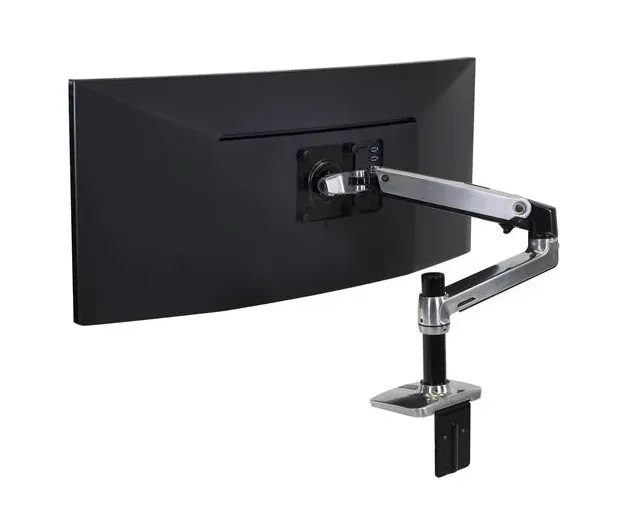
🏆 Best Overall: Ergotron LX Desk Mount LCD Arm
Price: $150-$200 | Capacity: 25 lbs | Monitor Size: Up to 34”
The Ergotron LX earned its reputation as the gold standard for good reason. Its aircraft-grade aluminum construction delivers premium build quality and rock-solid stability, while the smooth gas spring mechanism makes height adjustments effortless even with heavy monitors.
Key Features:
- 13” height adjustment with 25” reach extension
- Full 360° rotation with +70°/-5° tilt
- Lifetime warranty
- VESA 100×100 and 75×75mm compatibility
Best for: Users prioritizing long-term reliability and smooth operation who value quality over savings.
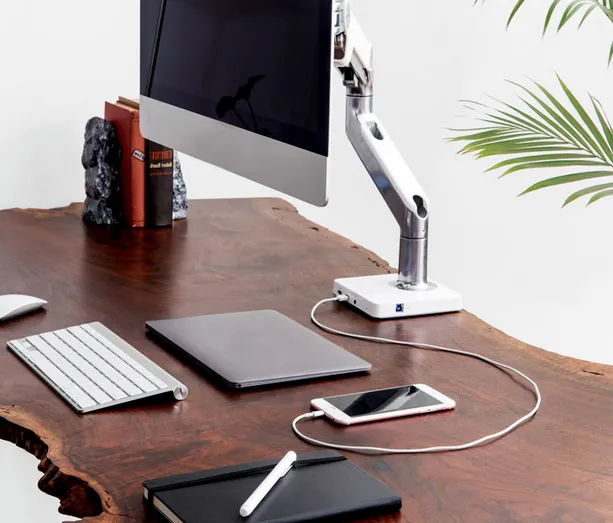
💡 Most Innovative: Humanscale M/Connect Docking Station Monitor Arm
Price: $400-$450 | Capacity: 20 lbs | Monitor Size: Up to 30”
Humanscale’s M/Connect transcends traditional monitor arms—it’s a complete workspace solution. The integrated USB-C docking station eliminates cable clutter while providing power delivery and data connectivity through a single laptop cable.
Key Features:
- Built-in USB-C hub with power delivery
- 17” height adjustment range
- Tool-free counterbalance adjustments
- Premium die-cast aluminum construction
Best for: MacBook and modern laptop users seeking the cleanest possible setup with cutting-edge connectivity.
💰 Best Budget: VIVO STAND-V001
Price: Under $50 | Capacity: 22 lbs | Monitor Size: 13”-27”
Don’t let the budget price mislead—the VIVO STAND-V001 delivers solid performance where it matters. While materials feel less premium than expensive alternatives, it provides adequate stability and adjustment range for most users at an unbeatable price.
Key Features:
- 16” height adjustment range
- 15.75” reach extension
- +85°/-15° tilt range
- Clear installation instructions
Best for: Budget-conscious users with smaller monitors (24-27”) who prioritize function over premium materials.
⚖️ Best Value: Amazon Basics Monitor Arm
Price: $75-$100 | Capacity: 25 lbs | Monitor Size: Up to 32”
Amazon’s house brand delivers surprising quality at this price point. The gas spring mechanism operates smoothly, build quality feels solid, and integrated cable management keeps setups clean—all for less than half the price of premium alternatives.
Key Features:
- 14.6” height adjustment with 20.9” reach
- Smooth gas spring operation
- Built-in cable routing channels
- Steel construction with quality joints
Best for: Users seeking premium features like gas springs and cable management without premium prices.
Specialized Options
For Jarvis Desks: Jarvis Monitor Arm by Fully
Price: $130-$160
Designed to match Fully’s popular Jarvis line, this arm offers aesthetic cohesion and smooth counterbalance adjustments. However, the 17.6 lb capacity limits it to smaller monitors.
For Uplift Desks: Uplift Desk Monitor Arm
Price: $150-$175
Like the Jarvis arm, Uplift’s monitor arm matches their desk aesthetics while offering superior capacity (26.4 lbs) and excellent customer support.
For Dual Monitors: VIVO STAND-V002
Price: $60-$85
This dual-arm solution supports two 27” monitors (22 lbs each) with independent height adjustment, offering exceptional value for multi-monitor workflows.
Key Features to Consider
Adjustment Mechanisms
Gas Springs provide the smoothest operation, automatically counterbalancing monitor weight for effortless height changes. Found in premium models like the Ergotron LX and Amazon Basics arm.
Counterbalance Systems offer precise positioning, allowing exact monitor weight compensation. Humanscale and Jarvis arms use this approach.
Friction-Based mechanisms are most affordable but require more effort and may not hold position reliably over time.
Installation Methods
C-Clamp works with most desks up to 2.5” thick without permanent modification. Most versatile option.
Grommet requires drilling but provides cleaner appearance with base hidden below desktop.
Through-Desk offers maximum stability but requires permanent desk modification.
Cable Management
Modern arms increasingly focus on cable management. Look for built-in routing channels or clips to organize USB, power, and display cables during height adjustments.
Compatibility Guide
Monitor Size and Weight
- 24” monitors (8-12 lbs): Any recommended arm works
- 27” monitors (12-18 lbs): Avoid ultra-budget options under $40
- 32” monitors (15-25+ lbs): Stick to arms with 25+ lb capacity
- Ultrawide 34”+ (20-30+ lbs): Requires heavy-duty arms; consider Ergotron HX line
Desk Compatibility
Most monitor arms work with any standing desk, but aesthetic matching matters for premium setups. Uplift and Jarvis offer perfectly matched arms, while universal options like the Ergotron LX complement any desk.
Essential Pairing Accessories
While your monitor arm handles screen positioning, consider pairing it with complementary ergonomic accessories for optimal comfort. A standing desk–optimized keyboard tray is designed specifically to maintain proper posture at elevated desk heights. A standing desk keyboard tray restores alignment by keeping the keyboard at the correct height—even when the desk is fully raised. Learn more about keyboard tray options for standing desks.
For complete standing comfort, especially during longer work sessions, if you use a standing desk, an anti-fatigue mat can reduce discomfort from prolonged standing. The soft surface helps your legs move slightly and improves blood flow. Our standing desk setup guide covers all the essential accessories to maximize your ergonomic workspace.
2026 Market Trends
This year’s standout trend is integrated connectivity. Humanscale’s USB-C docking approach represents the future—expect more manufacturers to follow. We’re also seeing improved cable management across all price segments and longer warranties as brands compete on value.
Sustainability is emerging as a factor, with manufacturers introducing recycled materials and carbon-neutral shipping.
Making Your Decision
Choose the Ergotron LX for proven reliability, smooth operation, and long-term value. The lifetime warranty makes it an excellent investment.
Choose the VIVO STAND-V001 if budget is primary and you have a smaller monitor (27” or less). It delivers adequate performance at an unbeatable price.
Choose the Amazon Basics arm for premium features like gas springs and cable management at a reasonable price.
Choose the Humanscale M/Connect if you use a modern laptop and want the cleanest setup with cutting-edge connectivity.
The perfect monitor arm transforms your standing desk from a simple adjustable surface into a fully ergonomic workspace that adapts seamlessly to your needs. Whether investing under $50 or $400+, choosing the right arm pays dividends in comfort, productivity, and workspace aesthetics for years to come.