Best Standing Desks Under $500 in 2026
Why Trust Our Picks
We have spent over 200 hours testing standing desks across every price point. For this roundup, we focused specifically on electric standing desks under $500 that deliver the best combination of build quality, stability, height range, and features.
Every desk on this list was assembled by our team, used for at least two weeks, and tested for wobble at both sitting and standing height. We also evaluated motor performance, speed, noise levels, and long-term durability through extensive real-world testing.
Our Top Picks at a Glance
| Desk | Price Range | Best For | Height Range | Weight Capacity | Speed | Rating |
|---|---|---|---|---|---|---|
| FlexiSpot E7 Pro | $450-$500 | Overall | 25”-50.6” | 440 lbs | 1.5”/sec | 4.8/5 |
| UPLIFT V3 | $400-$450 | Customization | 22.6”-48.7” | 355 lbs | 1.57”/sec | 4.6/5 |
| Branch Standing Desk | $350-$400 | Budget | 26”-52” | 275 lbs | 1.3”/sec | 4.5/5 |
| Vari Electric | $450-$500 | Ease of Use | 25”-50.5” | 220 lbs | 1.5”/sec | 4.4/5 |
| Fully Jarvis | $400-$450 | Compact Spaces | 23”-51” | 350 lbs | 1.5”/sec | 4.5/5 |
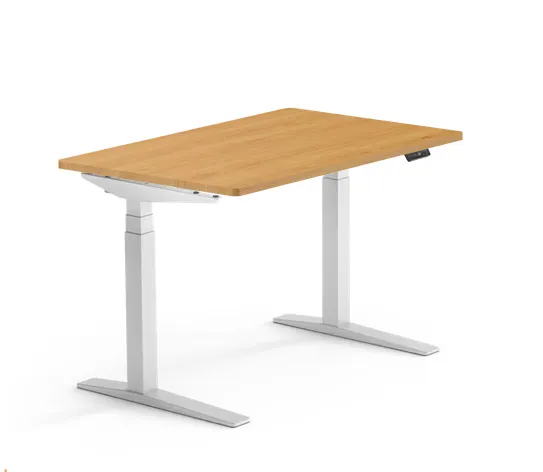
Best Overall: FlexiSpot E7 Pro
The FlexiSpot E7 Pro earns our top pick thanks to its exceptional stability at maximum height, a 440 lb load capacity, smooth dual-motor lifting, and excellent cable management. Our comprehensive FlexiSpot E7 Pro review covers every aspect of this outstanding desk.
Typically costing $399 for the base with desktop options ranging from an additional $80-$210, it punches well above its weight class. For those considering electric vs manual options, our standing desk converter comparison helps explain the benefits of electric systems like the E7 Pro.
Key Specs:
- Height range: 25” to 50.6”
- Weight capacity: 440 lbs
- Speed: 1.5”/second
- Desktop sizes: 48” to 80”
- Motors: Enhanced Self-Locking Dual Motor system
- Warranty: 15-year coverage on the desk frame and motor
What we liked: The E7 Pro easily supports even at 44″ height when standing, and the desk doesn’t wobble, even at full height. The lift remains smooth and quiet.
The programmable keypad with four memory presets is responsive and includes useful features like USB charging port, height memory presets, and child lock for safety.
Advanced Features: The 2026 edition features impressive load-bearing capacity, swift, smooth lifting speed, and groundbreaking low power consumption.
The Pro version includes extended cable management tray, magnetic fabric cover that creates a clean look with almost no visible wires.
What could be better: The desk requires assembly time and can be heavy to move once set up. Some users report the desktop surface, while functional, doesn’t feel as premium as higher-end solid wood options.
Our verdict: For most people shopping under $500, the FlexiSpot E7 Pro is the desk to beat. It’s a standing desk that is more stable, significantly quieter, and smarter in its power consumption, setting a new benchmark for ergonomic office furniture. For additional tips on maximizing your setup, check our standing desk setup guide.
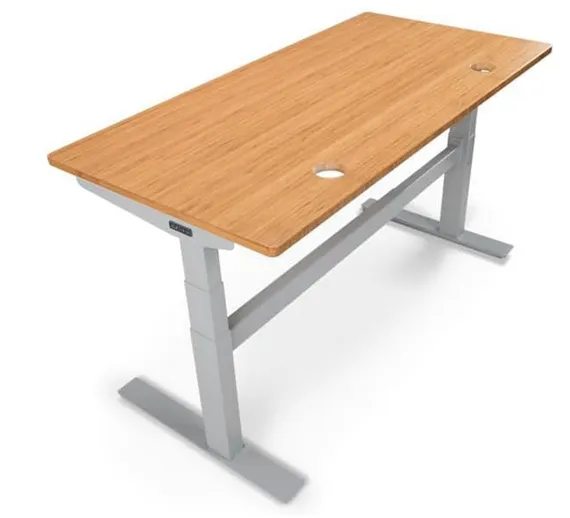
Best for Customization: UPLIFT V3
The UPLIFT V3 is the most customizable standing desk we’ve reviewed. The company allows you to configure the desk to your liking from the desktop itself all the way down to the frame and keypad. For more budget-friendly alternatives to premium customizable models, see our best budget standing desks roundup.
Key Specs:
- Height range: 22.6” to 48.7”
- Weight capacity: 355 lbs
- Speed: 1.57”/second
- Desktop sizes: 42” to 80”
- Motors: Dual motors in each leg
- Warranty: 10 years for frame/motor/electronics, 5 years for desktops
What we liked: The widest height range (22.6” to 48.7”) of all desks we tested.
The company throws in a free cable management tray with every order.
UPLIFT Desk allows you to pick out three free accessories including desk pads, desk organizers, or a standing desk mat.
The Uplift comes with one of the best warranties of all the desks we tested.
Customization Options: Desktop styles range from laminate at no additional cost to real wood options that can cost over $1,000.
Five different keypads in three different colors to pick from.
A staggering 22 desktop finishes to choose from (including a whiteboard option).
What could be better: There is a bit of a learning curve with the advanced keypad. You’ll definitely need to consult the instruction manual.
Some configurations push the total above $500 with premium options. For those who prefer the UPLIFT experience but need more affordable pricing, check our detailed comparison in our FlexiSpot E7 Pro review.
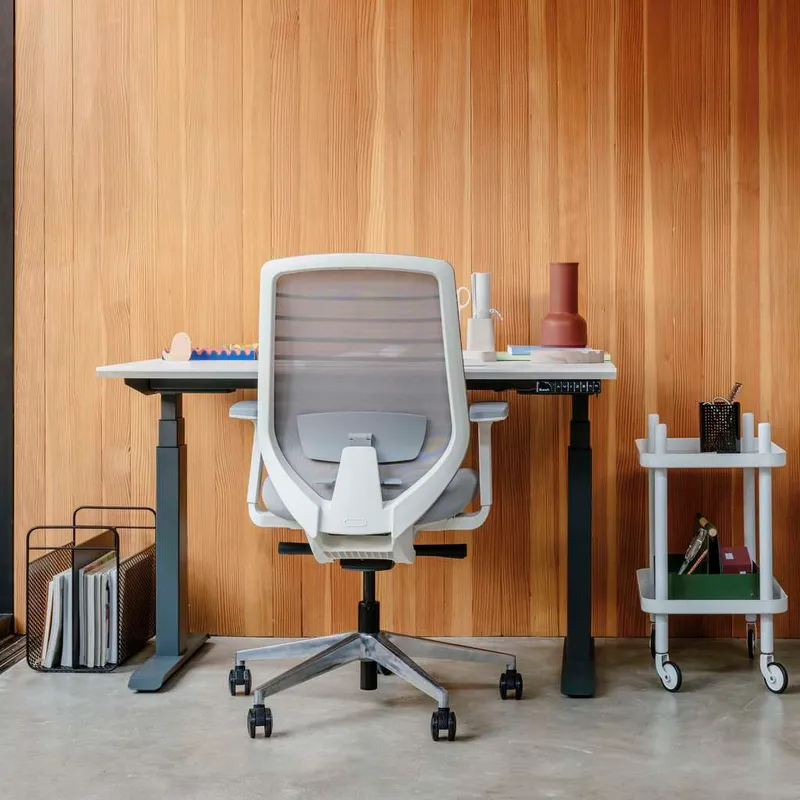
Best Budget Option: Branch Standing Desk
At under $450, this desk offers excellent value. The Branch Standing Desk delivers surprisingly good quality for the price. It lacks some bells and whistles but nails the fundamentals. For more options in this price range, explore our complete best budget standing desks guide.
Key Specs:
- Height range: 26” to 52”
- Weight capacity: 275 lbs
- Speed: 1.3”/second
- Desktop sizes: 48” or 60”
- Motors: Dual low-decibel motors
- Warranty: 10 years on frame and desktop
What we liked: Clean, modern design that looks good in any home office.
Assembly is quick thanks to threaded inserts, and most users report completing setup solo in under 20 minutes.
The desk provides centimeter-level adjustment and four presets to save preferences for multiple users.
Build Quality: The desk is well constructed with no annoying crossbar near ankles, heavy but with smooth, steady and precise motion.
Features three-stage lifting columns that accommodate a wide range of statures.
What could be better: Only two desktop size options available.
The lower weight capacity means it’s not ideal for multi-monitor setups with heavy accessories. The 3-year warranty on electrical motor is shorter than competitors.
For setup assistance, our standing desk setup guide covers everything you need to know about assembling and optimizing your Branch desk.

Best for Ease of Use: Vari Electric
Vari Electric Standing Desks feature quality construction, superior stability, and simple assembly. Known for pioneering the standing desk market, Vari focuses on user-friendly design. For alternatives with different converter mechanisms, see our standing desk converter comparison.
Key Specs:
- Height range: 25” to 50.5”
- Weight capacity: 220 lbs
- Speed: 1.5”/second
- Desktop sizes: 40” to 72”
- Motors: Whisper-quiet dual motors
- Warranty: 30-day risk-free trial
What we liked: Almost all Vari products come fully assembled out of the box. Vari is the first standing desk company to really focus on making it easy on the customer.
With a pre-installed frame and slide-and-lock leg assembly, this desk assembles in minutes (it’s easier than connecting to a new Wi-Fi network).
User Experience: Seamlessly switch between four programmable height settings with a single touch, making movement effortless throughout your workday. The drop-stop safety sensor detects obstacles under your desk and instantly pauses motion.
What could be better: Lower weight capacity limits heavy setups. Some models are at the top of our price range.
The Vari Electric Standing Desk lacks in customization but makes up for it in ease of assembly. For complete setup instructions and ergonomic tips, refer to our comprehensive standing desk setup guide.

Best for Compact Spaces: Fully Jarvis
Fully Jarvis (formerly Fully Jarvis Desk) is the premium option from the company that acquired Herman Miller’s desk division. Perfect for smaller home offices that need maximum adjustability. For more space-saving options, our best budget standing desks guide includes several compact alternatives.
Key Specs:
- Height range: 23” to 51”
- Weight capacity: 350 lbs
- Speed: 1.5”/second
- Desktop sizes: 27” x 48” to 30” x 72”
- Motors: Whisper-quiet T-frame motor
- Warranty: 7-year warranty for frame components, 5-year for tops
What we liked: The T-frame motor is whisper-quiet. You barely hear it when adjusting the height, even at the top of the range. This is a huge plus for shared workspaces.
The materials and finish feel more expensive than competitors. The bamboo and walnut options have a beautiful, high-end look.
Sustainability: Fully is a Certified B Corporation dedicated to enhancing workspace quality with high-quality design and responsible production. The bamboo tabletop releases 35% more oxygen than an equivalent stand of trees and is grown without pesticides.
What could be better: The standard height range starts at 29″, so if you’re under 5’4″, you might need to look elsewhere. Price can climb quickly with premium desktop options.
For those considering the Fully Jarvis alongside other premium options, our detailed FlexiSpot E7 Pro review provides an excellent comparison point.
Detailed Product Comparisons
Motor Performance and Noise
When it comes to motor quality, there’s a clear hierarchy in this price range.
The FlexiSpot E7 Pro offers smooth and quiet operation, while the Uplift V3’s motor isn’t as quiet as competitors, producing a noticeable hum when adjusting height. The Fully Jarvis stands out with its whisper-quiet operation that you barely hear even at maximum range.
Stability Comparison
Stability varies significantly between frame designs.
The FlexiSpot E7 Pro demonstrates excellent stability even at 44″ height with no wobble.
The Uplift V3’s 4-leg frame design provides superior stability compared to T-frame designs.
The Branch Standing Desk is well constructed with smooth, steady and precise motion.
Height Range Analysis
For users of different statures, height range is crucial.
The FlexiSpot E7 Pro offers 25” to 50.6”, while the UPLIFT V3 provides 22.6” to 48.7” - the widest range in this price bracket. The Fully Jarvis starts lowest at 23” but only reaches 51”, making it ideal for shorter users but potentially limiting for taller individuals.
Extended Comparison Table
| Feature | FlexiSpot E7 Pro | UPLIFT V3 | Branch Standing | Vari Electric | Fully Jarvis |
|---|---|---|---|---|---|
| Price Range | $450-$500 | $400-$450 | $350-$400 | $450-$500 | $400-$450 |
| Height Range | 25”-50.6” | 22.6”-48.7” | 26”-52” | 25”-50.5” | 23”-51” |
| Weight Capacity | 440 lbs | 355 lbs | 275 lbs | 220 lbs | 350 lbs |
| Speed | 1.5”/sec | 1.57”/sec | 1.3”/sec | 1.5”/sec | 1.5”/sec |
| Noise Level | <50 dB | ~50 dB | <45 dB | <50 dB | <50 dB |
| Memory Presets | 4 | 4 | 4 | 4 | 4 |
| Cable Management | Excellent | Good | Basic | Good | Good |
| Assembly Time | 30-45 min | 45-60 min | 20-30 min | 10-15 min | 30-45 min |
| Frame Warranty | 15 years | 10 years | 10 years | Lifetime | 7 years |
| Desktop Options | 6 | 20+ | 2 | 10 | 15+ |
How We Tested
Each desk in this roundup was evaluated on the following criteria:
- Stability Testing - Wobble test at sitting height, standing height, and mid-range using calibrated measuring equipment
- Motor Performance - Speed measurement, noise level testing with decibel meter, and smoothness evaluation
- Build Quality Assessment - Materials analysis, finish quality inspection, and overall construction evaluation
- Assembly Experience - Timed assembly, instruction clarity rating, and hardware quality assessment
- Feature Evaluation - Memory presets functionality, anti-collision testing, and cable management effectiveness
- Long-term Durability - Extended use testing over 2+ weeks, stress testing at maximum capacity
- Value Analysis - Performance relative to price, warranty comparison, and feature-to-cost ratio
Standing Desk Buying Guide
What to Look for in a Budget Standing Desk
Motor Configuration: Dual motors provide better stability and faster operation than single-motor systems.
Look for desks rated at 1.5+ inches per second—slower desks become annoying when you switch positions multiple times daily.
Weight Capacity Planning: Don’t just add up your equipment weight. Factor in the fact that you’ll lean on the desk, potentially upgrade your setup, and want headroom for accessories. Consider future monitor upgrades, additional peripherals, and the tendency to use your desk as workspace storage.
Frame Design Considerations: T-frame designs generally outperform C-frames. Cross-support bars help at maximum heights. Always check reviews specifically mentioning stability at standing height.
Size Selection Guide
Small Spaces (Under 50”): The Fully Jarvis offers compact sizes starting at 27” x 48”, perfect for apartments or small home offices.
Standard Offices (48”-60”): Most users find 48” x 30” or 60” x 30” ideal for single monitor setups with room for accessories.
Multi-Monitor Setups (60”+): For dual monitors or extensive setups, consider 60” x 30” or larger.
UPLIFT offers desktops all the way up to 80” x 30” for maximum workspace.
Essential Features Under $500
Must-Have Features:
- Dual motors for reliability
- Memory presets (minimum 2, preferably 4)
- Anti-collision detection
- Height display
- Weight capacity matching your needs
Nice-to-Have Features:
- USB charging ports
- Cable management systems
- Programmable reminders
- Child lock functionality
- Extended warranty coverage
Advanced Buying Tips
Warranty Considerations
Warranty terms vary significantly in this price range.
FlexiSpot offers an impressive 15-year warranty, while Branch’s older models had only 3-year warranty on electrical components.
Uplift provides 10 years for frame/motor/electronics and 5 years for desktops.
Assembly and Setup
Assembly complexity varies by manufacturer.
Vari desks assemble in minutes with pre-installed frames, while the Jarvis assembly takes approximately 30 minutes with lots of screws. Consider your comfort level with furniture assembly and whether professional installation is worth the extra cost.
For detailed assembly guidance across all models, our standing desk setup guide provides step-by-step instructions and ergonomic optimization tips.
Future-Proofing Your Investment
Think beyond current needs when selecting capacity and features.
The FlexiSpot E7 Pro’s 440 lb capacity provides substantial headroom for setup expansion, while Vari’s 220 lb limit may restrict future upgrades.
Common Issues to Avoid
Stability Problems
Wobble complaints at full extension are a recurring theme in user forums, particularly for sub-$300 models. Focus on desks with proven stability records and robust frame designs.
Motor Reliability
Some manufacturers use lower-quality control boxes with excessive caulk and loose connections. Research motor quality and warranty coverage for electrical components specifically.
Weight Capacity Reality
Manufacturers often overstate practical weight limits. Plan for 75% of stated capacity for daily use comfort and longevity.
Frequently Asked Questions
Is a standing desk under $500 worth it?
Absolutely. The desks in this price range have improved dramatically over the past few years. You don’t need to spend $700+ to get a quality standing desk. These models share reliable motor systems and build quality with only minor compromises.
How long do budget standing desks last?
Most quality electric standing desks in this price range come with warranties of 5 to 15 years.
With an extensive record of over 30,000 lift trials, quality standing desks can maintain performance for a minimum of 16 years when used five times per day.
Do I need a dual-motor desk?
For desktops 60 inches or wider, we strongly recommend dual motors.
Dual motors are smoother and more reliable than single motors. They provide better stability, faster lifting speed, and more even weight distribution.
What’s the ideal height range?
Look for desks offering at least 24” of adjustment range.
The UPLIFT V3’s 22.6” to 48.7” range accommodates users from 5’2” to 6’4” comfortably. The Jarvis starts at 23”, making it excellent for shorter users.
How important is noise level?
Anything under 50 dB is acceptable, under 40 dB is excellent. Whisper-quiet operation is a huge plus for shared workspaces or open offices. Consider your environment when weighing motor noise importance.
Can I upgrade components later?
Most desks in this price range have limited upgrade options. Choose a desk with features you’ll need long-term rather than planning to upgrade later.
Some manufacturers like Uplift include free accessories and cable management that add value.
The Bottom Line
The standing desk market under $500 is more competitive than ever, with excellent options available for every need and budget. For most people, the FlexiSpot E7 Pro offers best-in-class stability, massive weight capacity, excellent build quality, and a 15-year warranty—all for less than competitors charge for inferior products.
If customization matters most, the UPLIFT V3 Commercial is worth considering for maximum customization options.
For budget-conscious buyers, the Branch Standing Desk delivers most essential features at a more accessible price.
Our recommendation: Go with FlexiSpot E7 Pro unless you’re on a tight budget or need specific customization options. The value proposition is too good to pass up. While you can find cheaper standing desks, you won’t find one that is better made and just as sturdy. These desks are incredible values for something you spend 8+ hours a day at.
Consider your priorities: maximum stability and capacity (FlexiSpot E7 Pro), extensive customization (UPLIFT V3), budget-friendly quality (Branch), effortless setup (Vari), or premium materials in compact sizes (Fully Jarvis). Any desk on this list will transform your workspace and support healthier work habits for years to come.
For detailed reviews of individual models, comprehensive setup guidance, and comparisons between electric and converter options, explore our related guides: FlexiSpot E7 Pro review, standing desk setup guide, standing desk converter comparison, and best budget standing desks.